


Comikey - Manga & Webcomics
3.481.00 Reviews
App Specs
- Version
- 25.06.26
- Updated On
- License
- Free
- Downloads
- 1,000,000+
- Developer
- Comikey Media
- Categories
- Comics
- Platform
- Android, iOS
Screenshots






 Analysis by AppCompare
I judge a comics app by more than how many stories it can put on a screen. I want to find my way around without effort, read comfortably in the situations I actually have time to read, and understand where free access ends before I get invested in a series. Comikey - Manga & Webcomics is a free comics app from Comikey Media, aimed at readers who want manga and webcomics on a phone. My impression is that it works best as a convenient place to explore and keep up with comics, though the reading experience depends on whether its presentation and access model suit your habits.
Finding a story and following the reading flow
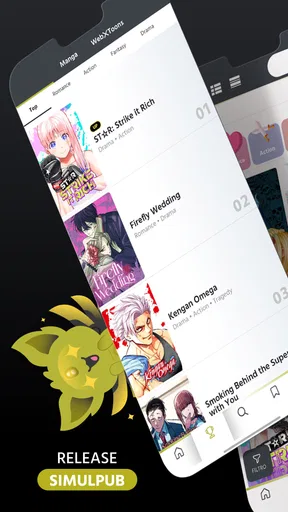
For someone who already has a title in mind, a straightforward interface matters: the less time spent hunting through menus, the sooner reading can begin. I found the navigation easy to approach, and browsing by genre gives curious readers a practical route into unfamiliar series. The library feels broad enough to invite exploring different kinds of stories, from action and romance to thrillers, although a large selection can still mean taking a little time to find the right fit.
That browsing approach is particularly useful when I have no specific plan. Instead of opening the app only to search for a known series, I can treat it as a place to sample a few possibilities and decide what deserves a longer commitment. I would still choose based on the individual story and its art rather than assuming every title will suit me. That small distinction helps set expectations: a varied catalogue offers choice, not a guarantee that every reader will find every genre equally compelling.
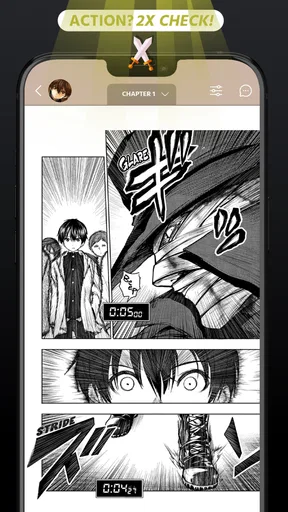
The comic pages are presented with artwork that looks crisp on a phone, which is important when panels carry small expressions or background details. I like that the visual work remains central rather than feeling like an afterthought. The practical trade-off is that detailed comic art is still best enjoyed when I can give the screen my attention; a quick glance in poor light or while moving is not the same as settling in to read.
Readability, navigation, and keeping your place
In everyday use, the interface felt clean and uncomplicated. I could move between sections without feeling buried in menus, and the reading flow felt smooth when moving from one chapter to the next. That matters because interruptions can break the rhythm of a cliffhanger or a carefully paced scene. Continue Reading is especially helpful if, like me, you tend to put a story down between errands and forget the exact point where you stopped.
I would use that continuity deliberately: finish a chapter before closing the app when possible, then return through the continuation option rather than relying on memory or searching through a series again. It is a small habit, but it makes short reading sessions easier to resume. For readers who follow several titles at once, a clear return point can be more useful than another discovery feature, because it reduces the little bits of friction that otherwise pile up.
There is a limit to what good navigation can solve. A simple interface does not automatically make every panel comfortable for every reader, and detailed artwork can call for closer attention than a text-heavy article. If you are sensitive to small on-screen details, test a chapter in the conditions where you normally read before settling into a long series. I would not assume that a layout that feels comfortable at home will feel just as easy on a dim commute or during a hurried break.
Worth Reading Before You Choose

EA SPORTS FC Mobile 26 Is a Bigger Football Game, but It Takes Time

Flipboard Shows What News Apps Must Do Beyond the Feed

Switching to Android Auto Means Rethinking Your Driving Routine

Google Calendar Makes a Crowded Week Easier to Manage

Ludo King Makes the Most of the Minutes Between Plans

Baby Panda World Brings Quick Play to Modern Phones, but Its Game Library Feels Busy
Different abilities and reading situations
For motor and sensory comfort, the clearest benefit I noticed is that the app does not make basic browsing feel like a puzzle. Fewer confusing navigation steps can help when a reader has limited patience for repeated tapping or simply wants to reach a chapter quickly. At the same time, comics demand visual scanning: panel order, artwork, and text all compete for attention. Readers who need larger text, strong contrast, spoken reading, or reduced visual stimulation should check whether the way a particular comic is presented works for them rather than assuming that a general-purpose comics reader will meet every need.
Context changes the experience too. At home, I can pause on an illustration or reread a line without worrying about missing a stop; in a waiting room, a short chapter can fill an otherwise idle stretch. On a crowded bus, however, the same detailed page may be harder to follow, and tapping through panels while standing can be awkward. I find Comikey most appealing for flexible, brief sessions when I can hold the phone steadily and focus, not as something to read while walking or doing another task that needs my attention.
The app is listed for Android and iOS, and the Android requirements include version 6.0 or later. Its Teen content rating is a useful starting signal for families, but I would still look at the subject and tone of an individual comic before recommending it to a younger reader. A rating cannot tell me whether a particular story is right for a specific teenager, so a parent choosing a series should make that decision title by title.
Community, access, and spending choices
Reading is the main draw, but the chance to comment and respond to other readers can add a social layer. I can see the appeal after a surprising reveal: a thoughtful discussion may make a chapter more enjoyable, especially when friends or other readers are following the same story. I would treat comments as an optional extra, though, not a reason to choose the app by itself. Someone who prefers to read privately can focus on the chapters, while someone who enjoys discussion may find it worthwhile to take a look.
The app is free to start, with in-app purchases ranging from $0.99 to $199.99 per item. That broad span makes it sensible to check the cost of the specific content or purchase before tapping through. My practical advice is to decide in advance how much you are comfortable spending, then treat paid access as a deliberate choice rather than an automatic part of keeping up. A free starting point lowers the barrier to trying the app, but it does not mean that every chapter or series will be available without spending.
That makes Comikey different from reading only comics you already own or relying on a single subscription service: it offers a place to browse and engage with a range of stories, while purchases may shape how far you can follow particular content. If predictable, all-in access is your priority, compare the actual costs and terms of the services available to you before committing. If you mainly want to sample titles and decide one at a time, a free app with optional purchases may feel more manageable.
Discovering New Worlds
One of the first things I noticed about Comikey is its vast library. It’s like stepping into a treasure trove of stories. There's something for everyone, whether you're into action-packed adventures, heartwarming romances, or spine-tingling thrillers. The app is pretty intuitive, making it easy to browse through genres and discover new titles that pique your interest.
What really caught my eye is how the app presents each comic. The artwork is stunning, and the high-resolution images make you feel like you're flipping through a physical book. It's a feast for the eyes, and for someone who appreciates good art, this is a major win.
User Experience and Interface
Let’s talk about usability. The interface is clean and straightforward. I didn’t find myself lost in endless menus or struggling to find what I wanted. The navigation is smooth, and the load times are impressive. You can jump from one chapter to the next without any lag, which is crucial for maintaining the flow of a good story.
Another cool feature is the "Continue Reading" option. I’m notorious for forgetting where I left off, and this feature saves me every time. It picks up right where you left off, so you don’t waste time searching for the last page you read. It’s the little things like this that make a big difference in the overall user experience.
Community and Interaction
Comikey isn’t just about reading; it’s about connecting with a community of like-minded individuals. The app allows you to leave comments and interact with other readers. It’s like having a mini book club at your fingertips. You can share theories, discuss plot twists, or just gush about your favorite characters. The community vibe is strong, and it adds another layer of engagement beyond just reading.
Accessibility and Availability
Now, let’s touch on accessibility. Comikey is available on both Android and iOS, so you can enjoy it whether you're team Apple or Android. The app is free to download, with in-app purchases available for premium content. This means you can sample a good chunk of the library before deciding if you want to invest in more. It’s a great way to explore without any upfront commitment.
As someone who’s on a budget, I appreciate the option to access a wide range of content for free. Of course, if you’re ready to dive deeper, the premium options are there, offering exclusive titles and early access to new chapters.
Checking fit before committing
Comikey has an average rating of 3.5 from around five and a half thousand ratings, and it has reached more than half a million installs. I read those figures as signs of a real audience, not proof that the app will suit every person. With a current version of 25.06.26, it is worth keeping the app updated so you are using its current release, particularly if you run into a navigation or loading issue.
For a realistic routine, imagine having ten minutes before an appointment. I would open a series I already follow, use the continuation point, and read while seated rather than trying to scan detailed panels while walking. If I finish a chapter and want to discuss a twist, comments offer a way to linger; if I am short on time, I can simply close the app and return later. That makes the strongest use case clear: convenient, stop-and-start reading, not an experience that demands a long uninterrupted session.
I would recommend trying it if you enjoy discovering manga and webcomics, value a simple route back into ongoing stories, and are comfortable checking purchase costs as you go. It is less suitable if your main requirement is a guaranteed all-you-can-read catalogue, if you need a particular reading aid that you cannot verify in a sample chapter, or if you want a screen-free way to consume comics. In those cases, a library or service with access terms and presentation that match your needs may be a better choice.
Final Thoughts
All in all, Comikey - Manga & Webcomics has positioned itself as a solid contender in the world of digital comics. Its extensive library, coupled with a user-friendly interface and a vibrant community, makes it a must-try for any manga or webcomics lover. Whether you're a seasoned reader or new to the scene, there’s something here for you to enjoy.
So, if you haven’t already, grab your device and give Comikey a whirl. Dive into the endless world of stories and let your imagination run wild. Happy reading!
My inclusive verdict
My overall view is positive, with a practical caveat: the app makes browsing and returning to a comic feel approachable, but comfort still depends on the reader, the artwork, and the setting. I would start with a title that interests me, try a short session in my usual reading environment, and check its access costs before making it part of a daily routine. That is a fair way to judge whether its combination of comics, navigation, and optional community suits you.
Comikey Media’s app is free to begin with, but I would not call it the right choice for every comics reader. It is most convincing when I want an easy mobile route into stories and can choose the titles and spending that work for me. If you prioritize specific accessibility tools or a different payment model, compare alternatives on those points first; if discovery and flexible reading matter more, Comikey is worth trying with realistic expectations.
Pros
- Wide range of manga and webcomics.
- User-friendly interface and navigation.
- Regularly updated with new content.
- Offline reading mode available.
- Supports multiple languages.
Cons
- Limited free content access.
- Ads can be intrusive at times.
- Requires a stable internet connection.
- Subscription needed for premium content.
- Some titles may not be available in certain regions.
FAQs for Comikey - Manga & Webcomics
What is Comikey and what type of content does it offer?
Comikey is a digital platform that provides a wide array of manga and webcomics. It offers content from various genres, including action, romance, fantasy, and more. Users can enjoy both popular series and hidden gems, making it a versatile choice for fans of illustrated storytelling.
Is Comikey available for both Android and iOS devices?
Yes, Comikey is available for download on both Android and iOS devices. Users can easily find the app in the Google Play Store for Android or the Apple App Store for iOS, ensuring accessibility across different platforms for a seamless reading experience.
Does Comikey offer any free content, or is it entirely subscription-based?
Comikey offers a mix of free and premium content. While some chapters and series are available for free, others require a subscription or in-app purchases to access. This allows users to explore the app without commitment while providing options for more extensive content access.
How often is new content updated on Comikey?
Comikey regularly updates its library with new chapters and series. While the schedule can vary depending on the publishers and creators, users can expect frequent updates to keep the reading experience fresh and engaging. Notifications can be enabled to stay informed about new releases.
Are there any customization options available for reading on Comikey?
Yes, Comikey offers several customization options to enhance reading comfort. Users can adjust the display settings, choose between different reading modes, and bookmark their favorite series for easy access. These features ensure a personalized and enjoyable reading experience.


